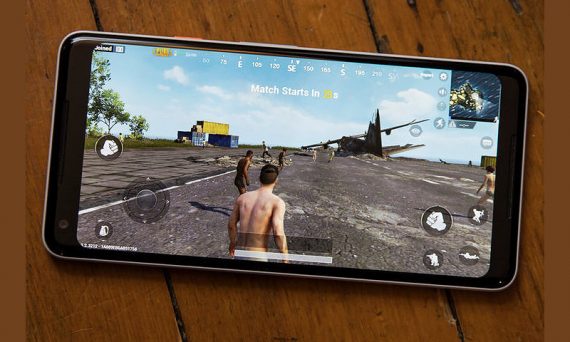
PUBG APK is a fast-rising game for Android, iOS, and on PC. If you a good smartphone and PC with at least 2GB RAM you will enjoy playing PUBG APK game on your smartphone. It’s quite challenging though but it really worth the time playing it. A lot of obstacles you need to overcome. Mastering of pulling the trigger when facing the deadly enemy with a better Arsenal compared to your own Arsenal.
You need a good game emulator to enjoy the best of the PUBG game though but notwithstanding, the PUBG game as a battlefield is definitely not a free ride for an amateur to succeed. You can spend a month playing a certain level if you are not good enough.
With the PUBG game, you can challenge your friends for a play online and get into the battlefield to know who is better and who is who. You may need to learn the video tutorial on how to play PUBG game though if you don’t want to learn it the hard way.
A thread on Reddit is always a good place to learn the trick to take down all your enemy very fast and without wasting your bullets, bombs, daggers, and other tools you have to fight with your enemy.
If you are good a driving, you would probably have an added advantage over your friends who don’t know how to drive and challenges you into playing PUBG game.
The PlayerUnknown’s Battlegrounds, PUBG game crashing is expected when you don’t upgrade to the latest version or when your device RAM could not play the game. If you are using Infinix, Tecno, Samsung, iPhone, Sony, Windows phone with 1GB RAM you will not be able to play the game.
The minimum size of PUBG APK is 1.3GB which requires a huge data to download. So, if you do not meet the following requirement don’t bother to download PUBG APK so that it won’t amount to a waste of resource.
Table of Contents
PUBG APK Game’s Requirement
To download and install the PUBG APK game your phone must meet the following requirements
PUBG APK PC Requirements
To play PUBG game on PC you must meet the following requirement according to the developer, Bluehole.
- OS: 64-bit Windows 7, Windows 8.1, Windows 10
- Processor: Intel Core i3-4340 / AMD FX-6300
- Memory: 6 GB RAM
- Graphics: Nvidia GeForce GTX 660 2GB / AMD Radeon HD 7850 2GB
- DirectX: Version 11
- Network: Broadband Internet connection
- Storage: 30 GB available space
PUBG Console Requirements
| System | Xbox One/S | Xbox One X |
| HD Space | 30 GB | 30 GB |
| (Actual install size) | 5.24 GB | 5.24 GB |
| Resolution | 1080p | 4K (4K textures, soon tm) |
PUBG APK Requirements
The game can be played on any Android phone with the following feature and it must be at least 2GB RAM
Snapdragon: 835, 821, 820, 660, 653, 652, 650, 625
Exynos: 8895, 8890, 7420, 5443
Apple: A11 bionic, A10, A9X, A9
MediaTek: X30, X25, X10, MT6797T, MT6797, MT6795, P10
Huawei Kirin: 658, 655, 970, 960, 955, 950, 935, 930
PUBG iOS Compatible Devices
You can play PUBG game on the following iDevice according to Bluehole, the developer.
Compatible with iPhone 5s, 6, 6 Plus, 6s, 6s Plus, SE, 7, 7 Plus, 8, 8 Plus, iPhone X, iPad Air, Air Wi-Fi + Cellular, mini 2, mini 2 Wi-Fi + Cellular, Air 2, Air 2 Wi-Fi + Cellular, mini 3, mini 3 Wi-Fi + Cellular, mini 4, mini 4 Wi-Fi + Cellular, 12.9-inch iPad Pro, 12.9-inch iPad Pro Wi-Fi + Cellular, 9.7-inch iPad Pro, 9.7-inch iPad Pro Wi-Fi + Cellular, iPad (5th & 6th generation), iPad Wi-Fi + Cellular (5th & 6th generation), 12.9-inch iPad Pro (2nd generation), 12.9-inch iPad Pro Wi‑Fi + Cellular (2nd generation), 10.5-inch iPad Pro, 10.5-inch iPad Pro Wi‑Fi + Cellular, and iPod touch (6th generation).
PUBG APK Download
| PUBG APK Android | File Size | Download | |
| XAPK | APK | ||
| PUBG Mobile v0.6.0 | 1.3GB | 33.5MB | Download |
| PUBG Mobile v0.5.0 | 1.2GB | 33.4MB | Download |
| PUBG Mobile v0.4.0 | 0.739GB | 32.4MB | Download |
| PUBG Mobile v0.3.3 | .709GB | 35.9MB | Download |
| PUBG Mobile v0.3.2 | .694GB | 31.1MB | Download |
In the table above, we provided only the links to download PUBG APK mobile game for Android. The XAPK requires additional installation procedure except you use the Uptodown APK app to download and install it.
PUBG APK Mobile Crashing Fix
Some PUBG game players are complaining about crashing after the game introduce a feature to pick region flag. However, whenever you are experiencing this difficulty follow the procedure below to fix it.
- Go to phone settings
- Tap on apps or apps managers
- Find PUBG game and click on it
- Tap on the storage feature under the game icon
- Tap on clear caches
Now, after the above procedure restart the game. Always make sure you download the latest PUBG game or update to the latest version at all time. You can also check for PUBG Mobile in play store if you don’t want to download the APK or XAPK.